> ## Documentation Index
> Fetch the complete documentation index at: https://extension.js.org/llms.txt
> Use this file to discover all available pages before exploring further.
# WebAssembly in browser extensions
> Use WebAssembly in browser extensions without custom bundler config. Extension.js ships built-in Wasm support in its Rspack build pipeline.
Use WebAssembly in your extension without custom bundler setup.
Extension.js ships with built-in WebAssembly (Wasm) defaults in its Rspack pipeline, so common Wasm workflows work without extra configuration.
## When WebAssembly is a good fit
* You run compute-heavy tasks in your extension (parsing, media, optical character recognition (OCR), transforms).
* You need near-native performance for frequently executed code paths.
* You are reusing existing Wasm modules from web projects.
## WebAssembly capabilities
| Capability | What it gives you |
| - | - |
| Built-in Wasm pipeline defaults | Run common Wasm flows without manual bundler wiring |
| Async Wasm support | Load `.wasm` modules in extension contexts |
| Runtime compatibility helpers | Handle common Wasm ecosystem asset patterns |
| Regular command workflow | Use Wasm with the same `dev` and `build` commands |
## Template examples
### `transformers-js`
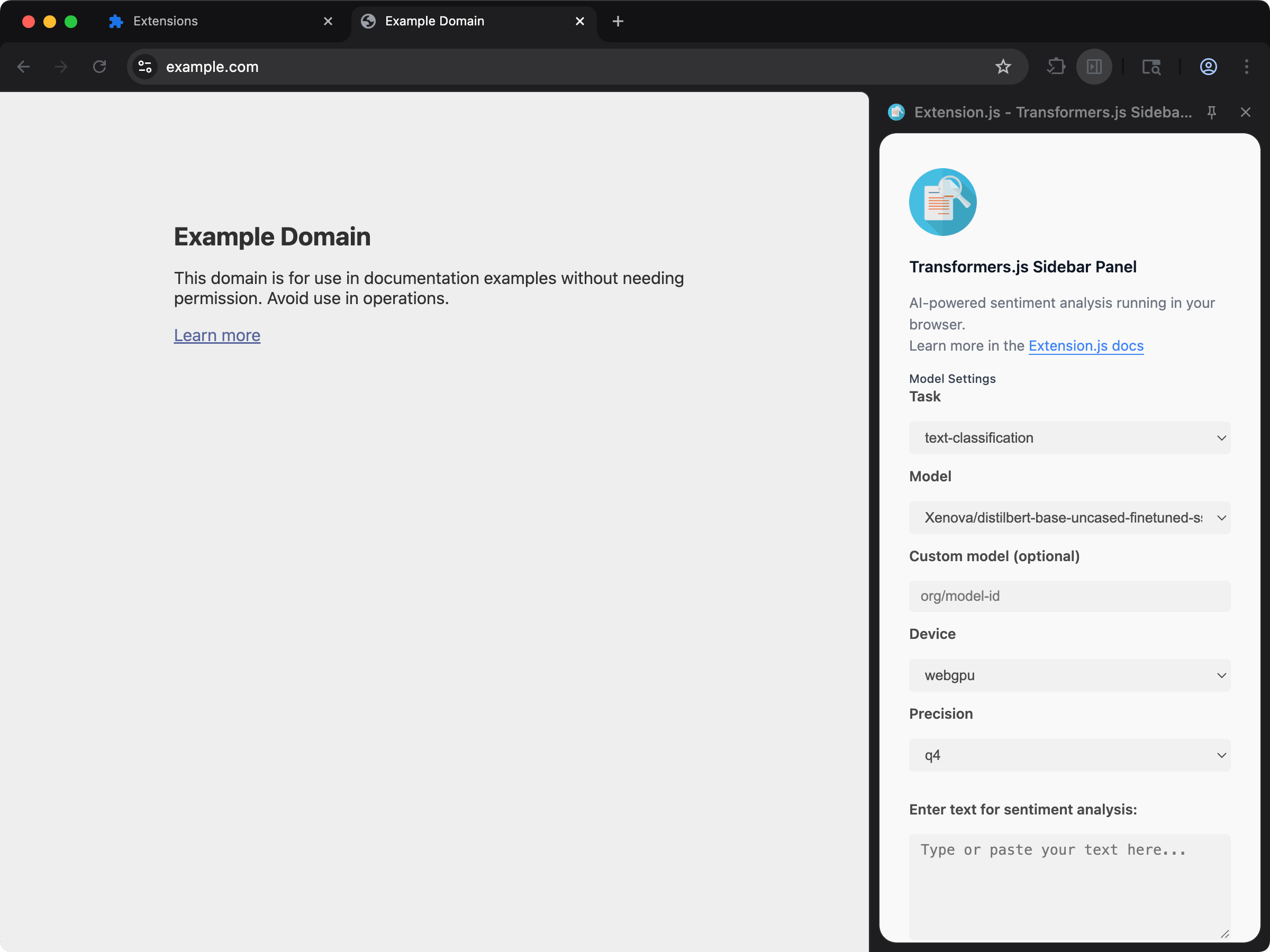 AI/ML sidebar extension using Transformers.js with WebAssembly-powered inference.
```bash npm theme={null}
npx extension@latest create my-extension --template=transformers-js
```
```bash pnpm theme={null}
pnpx extension@latest create my-extension --template=transformers-js
```
```bash yarn 2+ theme={null}
yarn dlx extension@latest create my-extension --template=transformers-js
```
```bash bun theme={null}
bunx extension@latest create my-extension --template=transformers-js
```
```bash deno theme={null}
deno run -A npm:extension@latest create my-extension --template=transformers-js
```
Repository: [extension-js/examples/transformers-js](https://github.com/extension-js/examples/tree/main/examples/transformers-js)
## What Extension.js enables
The Wasm plugin configures:
* `experiments.asyncWebAssembly = true`
* `.wasm` in module resolution extensions
* Path aliases for common Wasm libraries (for example, ffmpeg for media processing, imagemagick for image manipulation, and tesseract for OCR) so imports resolve correctly at runtime.
This reduces boilerplate when importing Wasm modules from extension scripts/pages.
## Ship a `.wasm` file as an asset
A plain `import` of a `.wasm` file instantiates it as an async WebAssembly module, which is what `wasm-bindgen` and `wasm-pack` output expects. Some libraries ship an Emscripten loader instead, one whose `init()` wants the file's URL or bytes. For those, add `?url`: the build copies the binary into `assets/` and gives your code its URL, with no change to `extension.config.js`.
```js theme={null}
import codecUrl from './codec.wasm?url'
const response = await fetch(codecUrl)
const bytes = await response.arrayBuffer()
```
The URL resolves inside the extension in every context, pages and the service worker included. This is the same `?url` contract the build offers for images, fonts and stylesheets.
Hand the loader the URL only when it accepts any protocol. Some runtimes take `http:` and `https:` only and throw on a `chrome-extension:` URL, `@imagemagick/magick-wasm` among them: its `initializeImageMagick` fails with "Only http/https protocol is supported". For those, fetch the emitted file yourself as above and pass the bytes, `initializeImageMagick(new Uint8Array(bytes))`.
## How to use
Use Wasm modules in your extension code as part of regular development/build flows:
```bash npm theme={null}
npx extension dev ./my-extension
```
```bash pnpm theme={null}
pnpx extension dev ./my-extension
```
```bash yarn 2+ theme={null}
yarn dlx extension dev ./my-extension
```
```bash bun theme={null}
bunx extension dev ./my-extension
```
```bash deno theme={null}
deno run -A npm:extension dev ./my-extension
```
You can also test against a known public Wasm sample:
```bash npm theme={null}
npx extension@latest dev https://github.com/GoogleChrome/chrome-extensions-samples/tree/main/functional-samples/cookbook.wasm-helloworld-print
```
```bash pnpm theme={null}
pnpx extension@latest dev https://github.com/GoogleChrome/chrome-extensions-samples/tree/main/functional-samples/cookbook.wasm-helloworld-print
```
```bash yarn 2+ theme={null}
yarn dlx extension@latest dev https://github.com/GoogleChrome/chrome-extensions-samples/tree/main/functional-samples/cookbook.wasm-helloworld-print
```
```bash bun theme={null}
bunx extension@latest dev https://github.com/GoogleChrome/chrome-extensions-samples/tree/main/functional-samples/cookbook.wasm-helloworld-print
```
```bash deno theme={null}
deno run -A npm:extension@latest dev https://github.com/GoogleChrome/chrome-extensions-samples/tree/main/functional-samples/cookbook.wasm-helloworld-print
```
## Typical use cases
* Compute-heavy parsing/transforms.
* Media processing pipelines.
* OCR / image processing workflows.
* Performance-sensitive algorithms shared across web/runtime contexts.
## Best practices
* Keep Wasm modules focused on hot paths; keep orchestration logic in JavaScript/TypeScript.
* Validate output size and load timing for extension contexts (background, content scripts, pages).
* Test Wasm-heavy flows across browser targets you ship (`chrome`, `edge`, `firefox`).
## Next steps
* Learn more about [WebAssembly](https://webassembly.org/).
* Learn how Extension.js works with [ECMAScript Modules](/docs/languages-and-frameworks/ecmascript-modules).
## Video walkthrough
This documentation is built and hosted on [Mintlify](https://mintlify.com), a developer documentation platform.
AI/ML sidebar extension using Transformers.js with WebAssembly-powered inference.
```bash npm theme={null}
npx extension@latest create my-extension --template=transformers-js
```
```bash pnpm theme={null}
pnpx extension@latest create my-extension --template=transformers-js
```
```bash yarn 2+ theme={null}
yarn dlx extension@latest create my-extension --template=transformers-js
```
```bash bun theme={null}
bunx extension@latest create my-extension --template=transformers-js
```
```bash deno theme={null}
deno run -A npm:extension@latest create my-extension --template=transformers-js
```
Repository: [extension-js/examples/transformers-js](https://github.com/extension-js/examples/tree/main/examples/transformers-js)
## What Extension.js enables
The Wasm plugin configures:
* `experiments.asyncWebAssembly = true`
* `.wasm` in module resolution extensions
* Path aliases for common Wasm libraries (for example, ffmpeg for media processing, imagemagick for image manipulation, and tesseract for OCR) so imports resolve correctly at runtime.
This reduces boilerplate when importing Wasm modules from extension scripts/pages.
## Ship a `.wasm` file as an asset
A plain `import` of a `.wasm` file instantiates it as an async WebAssembly module, which is what `wasm-bindgen` and `wasm-pack` output expects. Some libraries ship an Emscripten loader instead, one whose `init()` wants the file's URL or bytes. For those, add `?url`: the build copies the binary into `assets/` and gives your code its URL, with no change to `extension.config.js`.
```js theme={null}
import codecUrl from './codec.wasm?url'
const response = await fetch(codecUrl)
const bytes = await response.arrayBuffer()
```
The URL resolves inside the extension in every context, pages and the service worker included. This is the same `?url` contract the build offers for images, fonts and stylesheets.
Hand the loader the URL only when it accepts any protocol. Some runtimes take `http:` and `https:` only and throw on a `chrome-extension:` URL, `@imagemagick/magick-wasm` among them: its `initializeImageMagick` fails with "Only http/https protocol is supported". For those, fetch the emitted file yourself as above and pass the bytes, `initializeImageMagick(new Uint8Array(bytes))`.
## How to use
Use Wasm modules in your extension code as part of regular development/build flows:
```bash npm theme={null}
npx extension dev ./my-extension
```
```bash pnpm theme={null}
pnpx extension dev ./my-extension
```
```bash yarn 2+ theme={null}
yarn dlx extension dev ./my-extension
```
```bash bun theme={null}
bunx extension dev ./my-extension
```
```bash deno theme={null}
deno run -A npm:extension dev ./my-extension
```
You can also test against a known public Wasm sample:
```bash npm theme={null}
npx extension@latest dev https://github.com/GoogleChrome/chrome-extensions-samples/tree/main/functional-samples/cookbook.wasm-helloworld-print
```
```bash pnpm theme={null}
pnpx extension@latest dev https://github.com/GoogleChrome/chrome-extensions-samples/tree/main/functional-samples/cookbook.wasm-helloworld-print
```
```bash yarn 2+ theme={null}
yarn dlx extension@latest dev https://github.com/GoogleChrome/chrome-extensions-samples/tree/main/functional-samples/cookbook.wasm-helloworld-print
```
```bash bun theme={null}
bunx extension@latest dev https://github.com/GoogleChrome/chrome-extensions-samples/tree/main/functional-samples/cookbook.wasm-helloworld-print
```
```bash deno theme={null}
deno run -A npm:extension@latest dev https://github.com/GoogleChrome/chrome-extensions-samples/tree/main/functional-samples/cookbook.wasm-helloworld-print
```
## Typical use cases
* Compute-heavy parsing/transforms.
* Media processing pipelines.
* OCR / image processing workflows.
* Performance-sensitive algorithms shared across web/runtime contexts.
## Best practices
* Keep Wasm modules focused on hot paths; keep orchestration logic in JavaScript/TypeScript.
* Validate output size and load timing for extension contexts (background, content scripts, pages).
* Test Wasm-heavy flows across browser targets you ship (`chrome`, `edge`, `firefox`).
## Next steps
* Learn more about [WebAssembly](https://webassembly.org/).
* Learn how Extension.js works with [ECMAScript Modules](/docs/languages-and-frameworks/ecmascript-modules).
## Video walkthrough
This documentation is built and hosted on [Mintlify](https://mintlify.com), a developer documentation platform.